
Research with confidence: Introducing Claim Radar
This distinctive Trust Card feature expands the confidence signals that LeapSpace provides to help you calibrate the strength of responses.

As our recent Researcher of the Future report revealed, more than half (58%) of researchers now report using AI in their work. Yet only 22% of them say they trust the technology. Before we launched LeapSpace in January 2026, we worked closely with the academic community to understand what guidance we could provide to build their confidence in AI. We drew on that feedback to develop the Trust Card, which includes a “Link to statement”; a paragraph of text available for each claim in a LeapSpace response, which shows how closely it aligns with its underlying source. This helps streamline source verification and contextual analysis. But this was only the first step. The LeapSpace development team has a raft of exciting plans in the pipeline to build on the value of the Trust Card. And this week marked the release of the next phase of development – here’s what they introduced:
Claim Radar: Providing the bigger picture
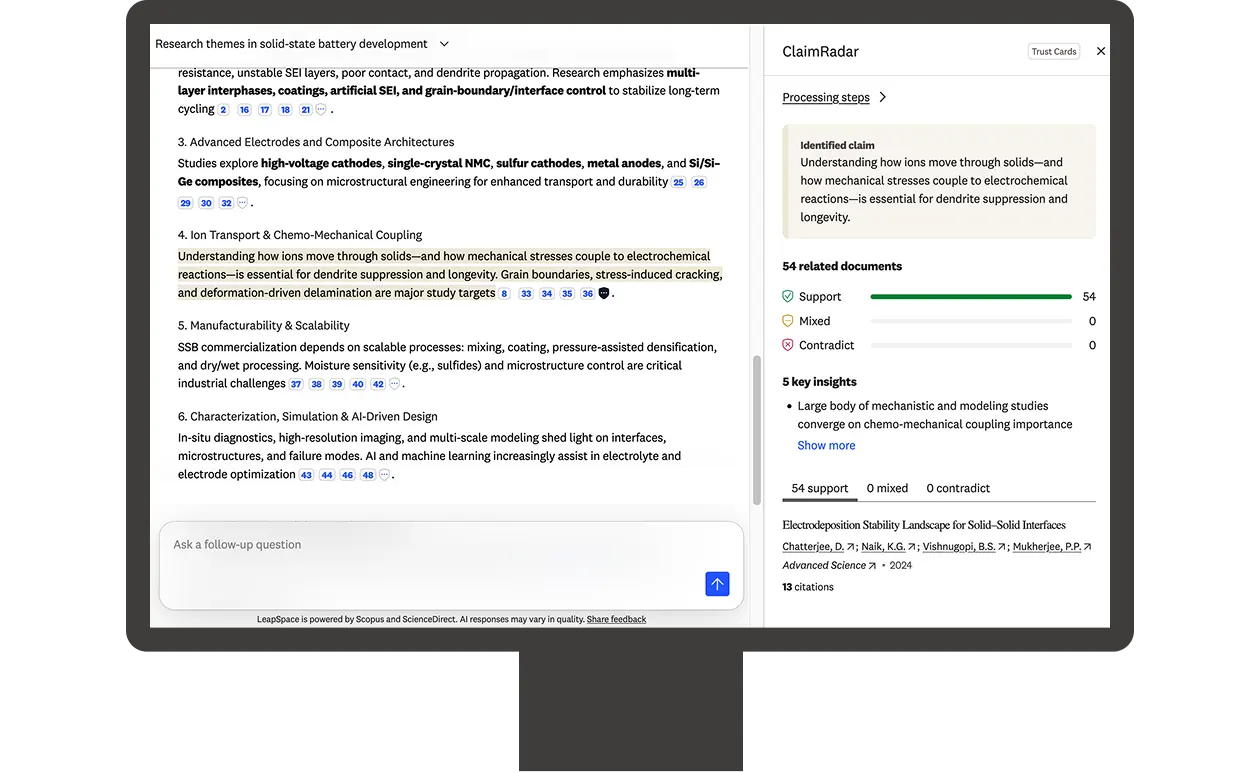
This new feature was inspired by early LeapSpace users who requested help to look beyond citations. They wanted to dig deeper and understand whether an AI-generated claim is supported or contested in the wider literature when existing literature was taken into account.
And that is what Claim Radar is designed to show. Better still, it specifies which — and how many — sources support, contradict, or have a mixed response to that claim. This helps you explore claims from multiple perspectives, and identify potentially controversial or emerging topics.
For Adrian Raudaschl, Senior Director of Product Management at Elsevier, Claim Radar marks a significant next step in the confidence signals that LeapSpace provides.
“With Claim Radar, we move from ‘how aligned is this claim with this one source’ to ‘how aligned is this claim with the wider research ecosystem’ — a really big shift."
“This kind of evaluation normally requires a researcher to run multiple searches on each aspect of their query, asking the right questions and covering all the angles. Then they have to review, collate, and analyze the responses. With Claim Radar we’ve made it very simple to do a mini literature review on almost any given claim very quickly."
He adds: “We talk about building trust, but the outcome of trust is that researchers can explore and work with more confidence. And confidence is what we are aiming to deliver with this feature. It's a very important part of our vision for LeapSpace.”
According to Adrian, Claim Radar was developed with a “first principles” approach to encourage critical thinking. “I think it shows how serious we are about providing the evaluation support researchers are looking for,” he adds. “And when we showed the prototype to researchers, the response was fantastic.”
Those researchers included David Henkelmann, an IT specialist and PhD student at Würzburg-Schweinfurt University of Applied Sciences in Germany, whose comment on seeing the prototype was: “I want it now. The sooner the better!”
For David, Claim Radar has the potential to address one of the fears that he and many other researchers struggle with — that they’ve missed key articles. He explains: “There is an overwhelming amount of literature out there and for every statement they contain, you can find work that agrees and disagrees. Often, I’m looking for a paper that proves a hypothesis I’ve come up with, so to be able to understand which works support it is really helpful. It’s also important to know which papers disagree — and why — because in my field of informatics and psychology, there is no right answer. I don’t want to publish and then discover there were works in the shadows that I missed."
Running a Claim Radar query
Access to Claim Radar is via the small shield symbol that appears next to each claim in a LeapSpace response.
Clicking on the shield triggers a panel to open to the right of the screen where you can follow Claim Radar’s steps as it searches for up to 40 of the most relevant sources using Scopus. Not all sources selected will appear in the final analyses — neutral responses are excluded.
Once it’s finished running, Claim Radar generates a line graph that shows how many of the remaining results fall into the support, contradict, or mixed categories. And if Claim Radar can’t find any relevant results for a category, it is designed to indicate this to you. Information on the sources used is accessible via category tabs at the bottom of the panel. Claim Radar also provides easy-to-scan key insights from its analysis.
Additional Trust Card insights
This week also marks the introduction of excerpts to the Trust Card. Now, when you click on a reference next to a claim in a LeapSpace response, you not only see the Link to paragraph, you can also see the related section of the abstract or full text used to generate that claim. Look out later this year for further Trust Card developments, including context to help you evaluate the source itself.